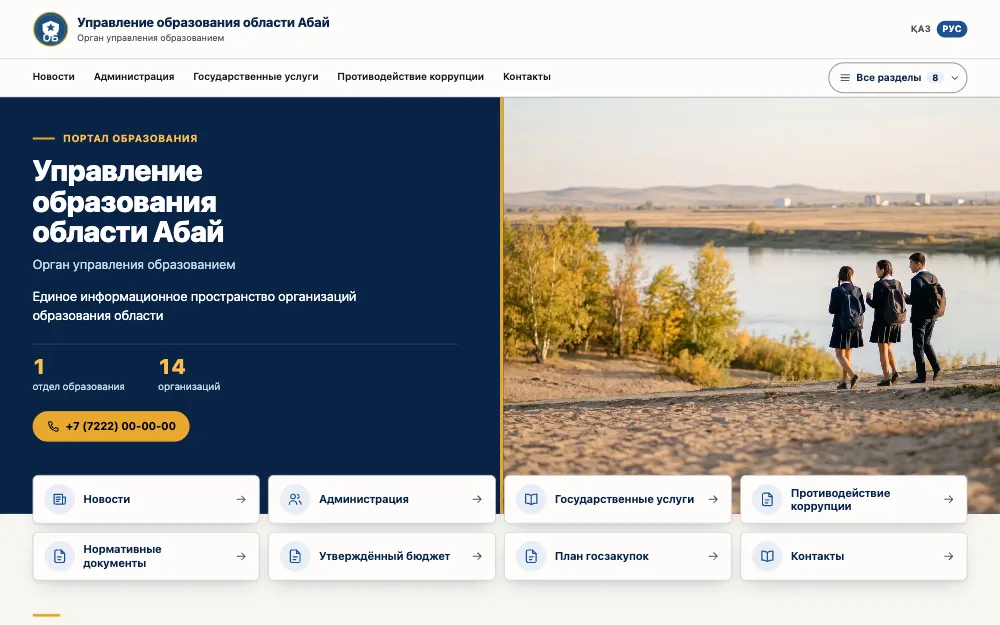
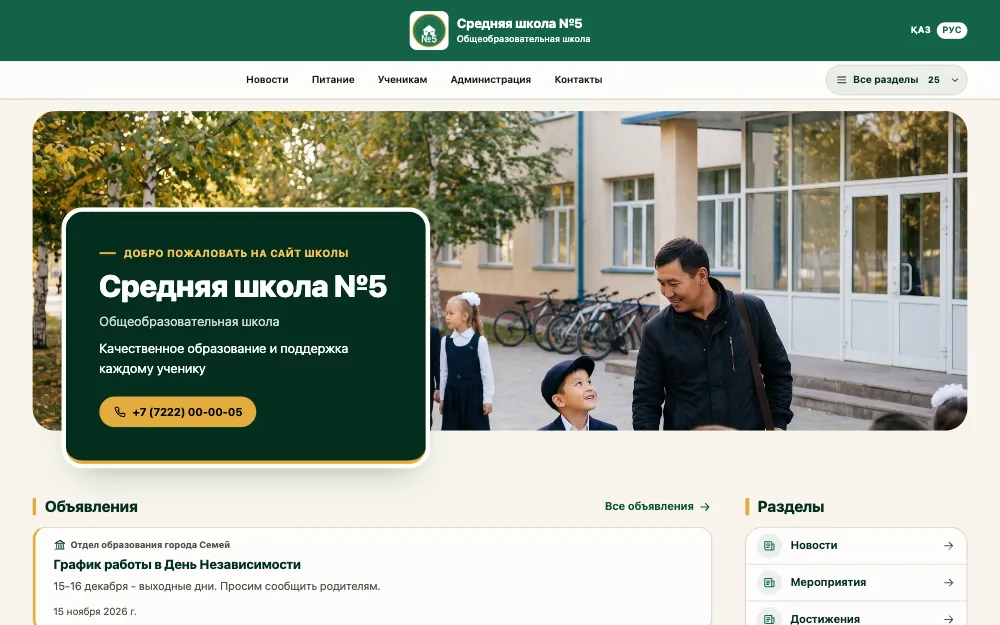
A website platform for education organisations

Many sites - one system

EduBox Core is the engine that runs the websites of all your organisations at once: an education department and its schools, a network of private schools or centres, a group of colleges. One installation and one admin panel, a site for every organisation - and one place to see which sites are up to date and which have fallen behind.

  • One installation for every site
  • Kazakh and Russian
  • Runs on your server

How it all comes together

From one program to the sites of a whole network

Six steps, one picture. Keep scrolling and watch it assemble.

  1. 1Step 1/6

    One program on your server

    A few commands prepare the server: doctor checks what is already there, install puts the program and its database side by side, setup sets the domain and creates the first administrator. It runs behind the web server you already have, or on its own.

  2. 2Step 2/6

    Organisations form a tree

    At the top is the head organisation, below it the departments or branches, and below them the schools, kindergartens and colleges. Access follows the tree: administrator, editor or observer - for an organisation and everything under it, or for that one only.

  3. 3Step 3/6

    Every organisation gets its own site

    Each node of the tree gets a site at its own address. The look is assembled from two layouts and six palettes, or your own colours with a contrast check, plus a logo, a home-page photo and a tagline. Changes show in a live preview before they are applied.

  4. 4Step 4/6

    People fill the sites

    A school editor writes a news item and publishes it, then uploads this year's document to the right section. Photos are processed automatically, and anything deleted can be restored from the bin.

  5. 5Step 5/6

    Freshness is visible from above

    Every required section has an update period. A department sees an organisations-by-sections table where the ones falling behind stand out at once. The head organisation sees which branches are behind.

  6. 6Step 6/6

    Top down, with one announcement

    The head organisation writes an announcement once and it appears on the sites below: mandatory ones straight away, recommended ones once an organisation accepts them. An urgent one shows as a red strip at the top of every site.

One installation, one tree, a site for everyone - and the whole picture in one place.

Who it is for

For those who have many sites, not one

The platform is built for education organisations with units under them - and for those growing in that direction.

  • Education authorities and departments

    A region, district or city with its schools, kindergartens and colleges: a site for each organisation and one view of what is up to date. This is where the product started.

  • Networks of private schools, kindergartens and centres

    A head office and branches: every branch has its own site in a shared style, and the network sees where information has gone stale.

  • A single organisation that may grow

    A school, kindergarten, college or learning centre that needs a tidy website. When branches appear, their sites join the same system.

  • Contractors

    Companies that build and maintain websites for education organisations: client sites in one installation, each client with its own access.

A familiar picture

When every organisation has a separate site

Usually each school's website is commissioned and maintained on its own. The same problems follow.

How it usually is: Separate installations, updates and contracts
How it is in EduBox Core: One installation for every site: one server, one update, one backup.
How it usually is: Nobody sees which sections are out of date
How it is in EduBox Core: Every required section has a deadline, and the organisation above sees the picture across all sites.
How it usually is: Different looks, different quality
How it is in EduBox Core: Shared layouts and palettes; each organisation sets up its site within them.
How it usually is: A site can simply stop working
How it is in EduBox Core: Unit sites live in a shared installation and do not depend on a separate maintenance or hosting contract.
How it usually is: Every editor learns a different system
How it is in EduBox Core: One admin panel with the same screens for everyone, roles, invitations and short built-in courses.

Three levels of one system

Everyone sees what is theirs

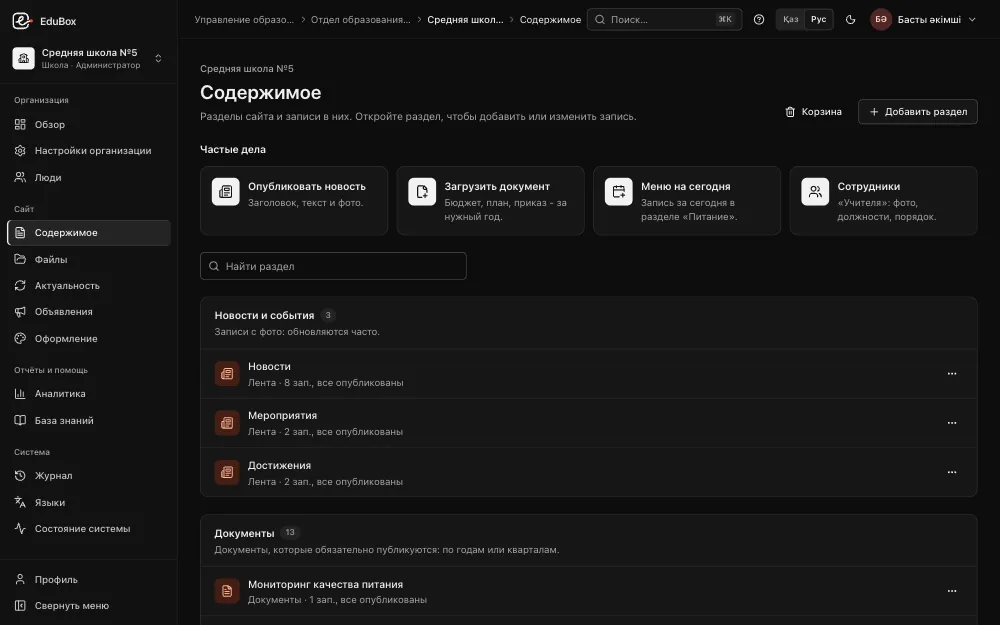
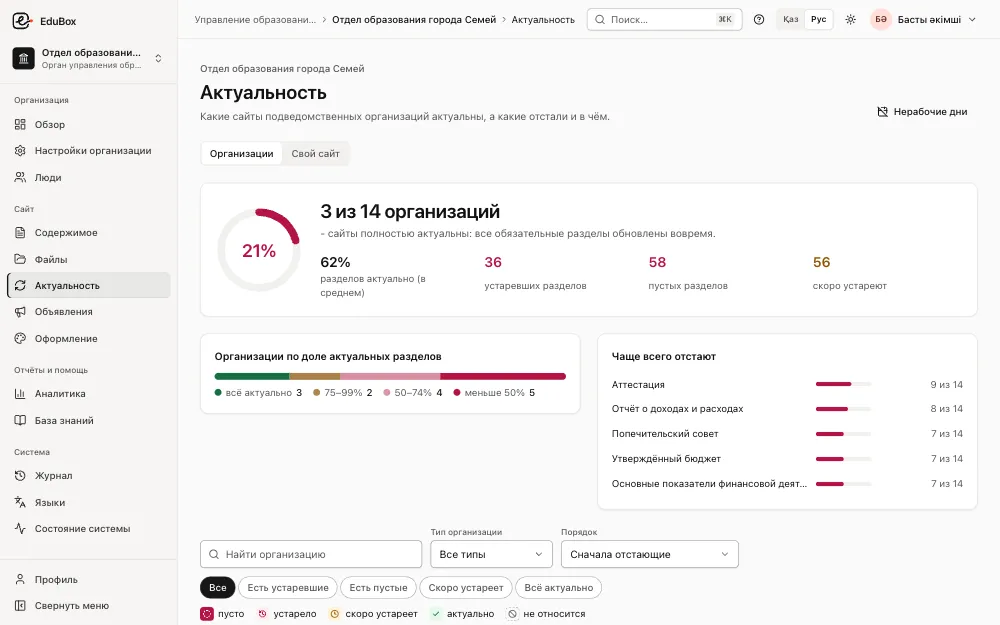
The screenshots show a demo education authority with a department and its schools. In a private network the levels are the same: head office, branches, schools and kindergartens.

1Organisation · for example, a school

Sees what needs updating and does it in one place

  • A to-do list: which sections are empty or out of date, and by when
  • Frequent tasks at hand: news, a document, today's menu, staff
  • Text editor, file library, photos processed automatically
  • Preview before publishing, a bin with restore
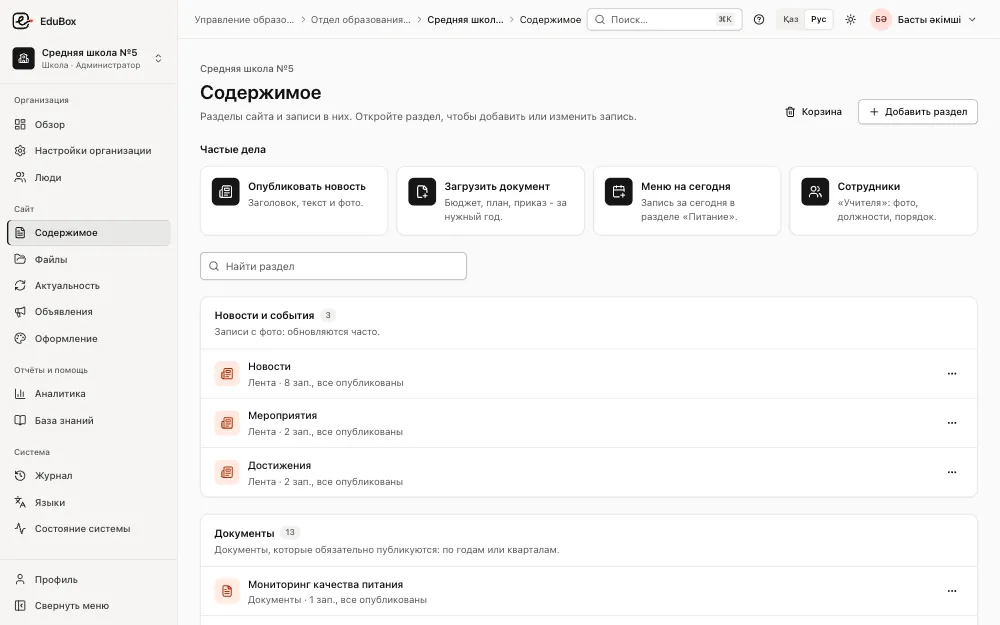
The Content screen of a school in the admin panel: frequent tasks and the site's sections with entry countsThe Content screen of a school in the admin panel: frequent tasks and the site's sections with entry counts

2Department or branch · for example, a city education department

Sees all its organisations on one screen

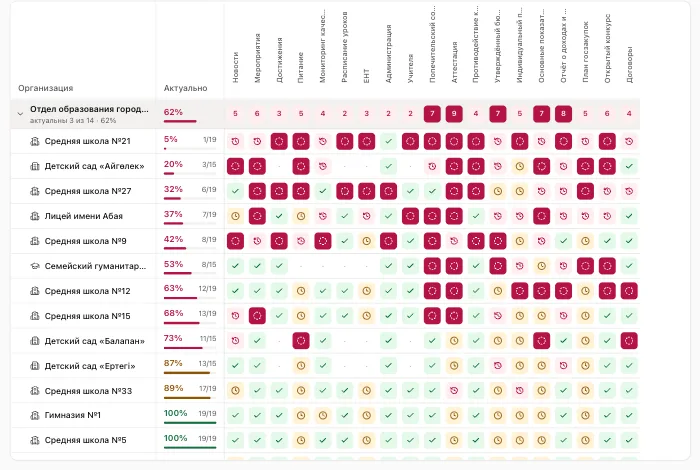
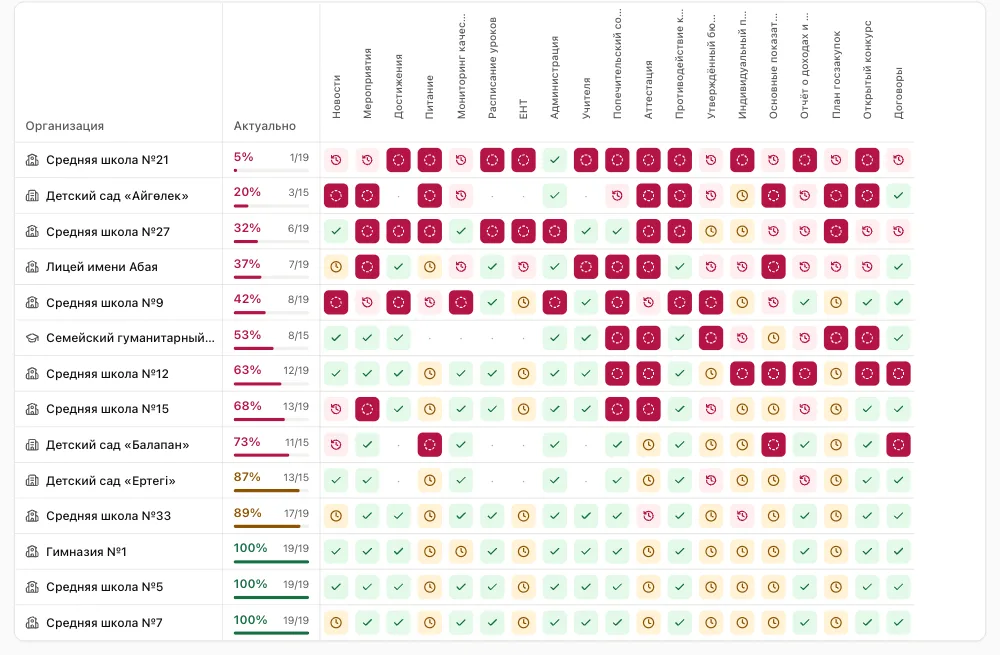
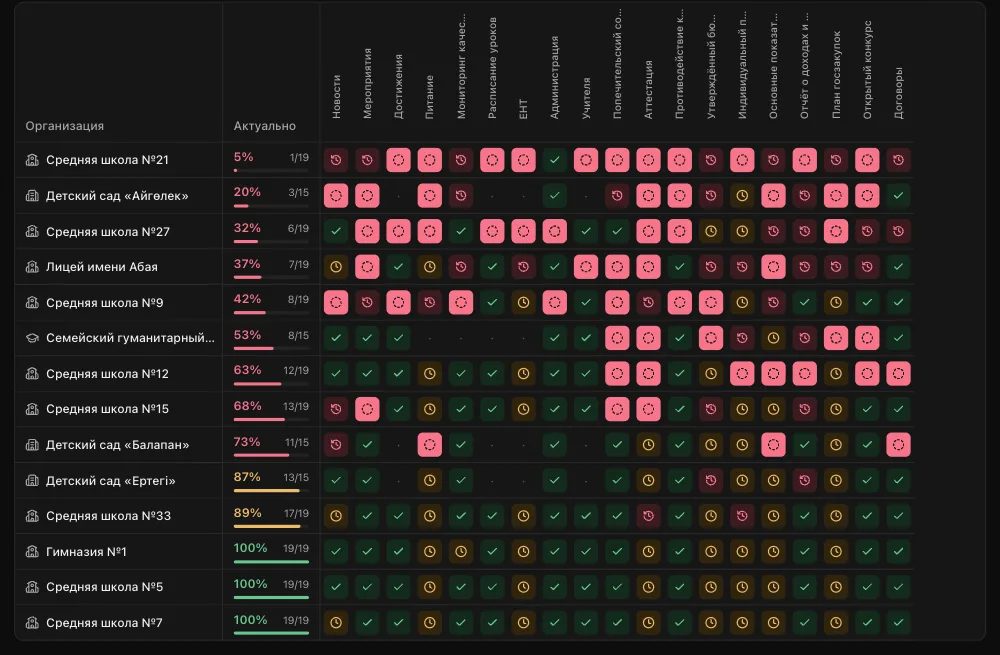
  • An organisations-by-sections table: colour shows what is empty, out of date or due soon
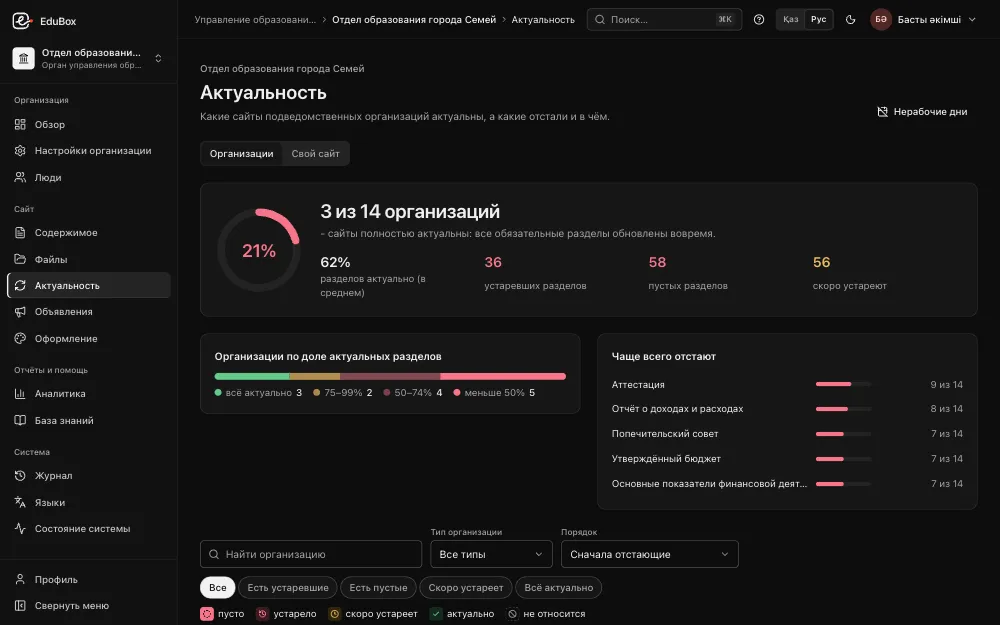
  • Which sections fall behind most often
  • Subordinate organisations, staff roles, invitations
  • Its own site - in the same system
A department's Freshness screen: how many organisations are fully up to date, counts of out-of-date and empty sections, the sections that fall behind most oftenA department's Freshness screen: how many organisations are fully up to date, counts of out-of-date and empty sections, the sections that fall behind most often

3Head organisation · for example, a regional education authority

Sees which departments or branches are behind

  • A summary by department and branch: the share of up-to-date sections
  • Drill down: from the head organisation to a department, from a department to a school
  • A calendar of non-working days: holidays and school breaks
  • Access by tree: 'this organisation and everything below' or 'this one only'
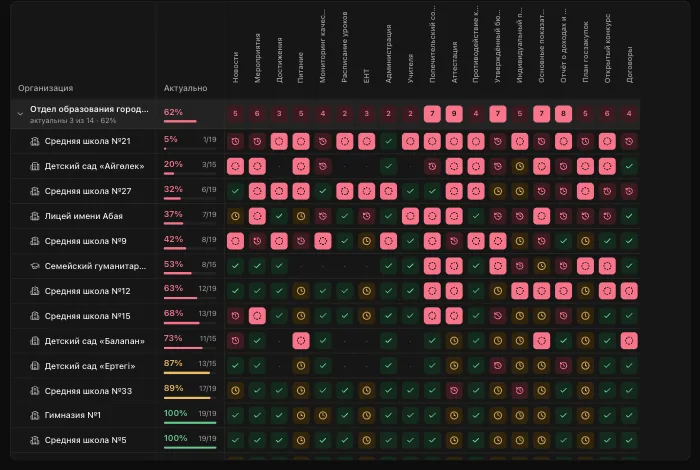
The freshness table at the head organisation level: a department row with the number of organisations behind in each section, and its schools and kindergartens belowThe freshness table at the head organisation level: a department row with the number of organisations behind in each section, and its schools and kindergartens below

The heart of the product

Freshness: the site shows for itself what is out of date

Every required section has an update period: news every week, events every month, the timetable every quarter, the canteen menu every working day. The system compares the date of the latest entry with the period and shows the result at three levels.

  1. 1

    A period for every section

    Each required section has a period: a day, week, month, quarter or year. Documents are counted by year or quarter.

  2. 2

    Organisation: a to-do list

    What is empty, what is out of date, what is due soon - and a button to add an entry right away.

  3. 3

    Department or branch: a table

    Organisations by sections. You see who has a gap, and where.

  4. 4

    Head organisation: the whole network

    Which departments or branches are behind, and by how much.

Hover over a cell, or pick one with the arrow keys
NewsEventsMealsTimetableTeachersContracts
School No. 1
School No. 2
Kindergarten
Lyceum
College
School No. 2 · Mealsout of datethe period has passed with no new entry.Period: every working day

The table is an example. The rules are the product's own.

  • empty
  • out of date
  • due soon
  • up to date
  • not applicable
A department's freshness table: rows are schools and kindergartens with their share of up-to-date sections, columns are required sections, cells are coloured by stateA department's freshness table: rows are schools and kindergartens with their share of up-to-date sections, columns are required sections, cells are coloured by state
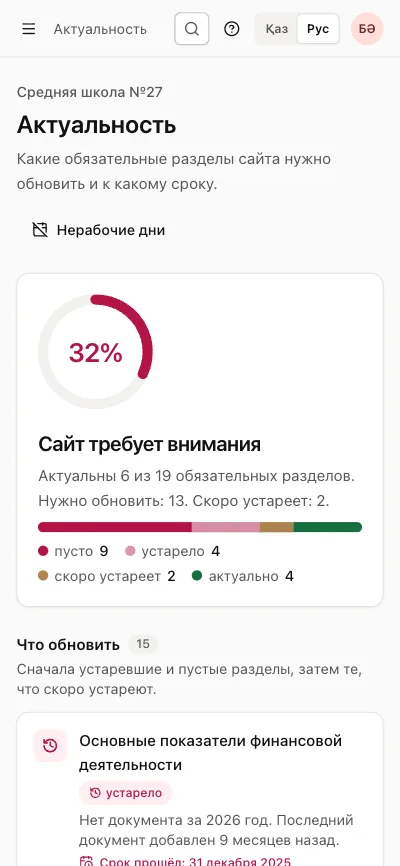
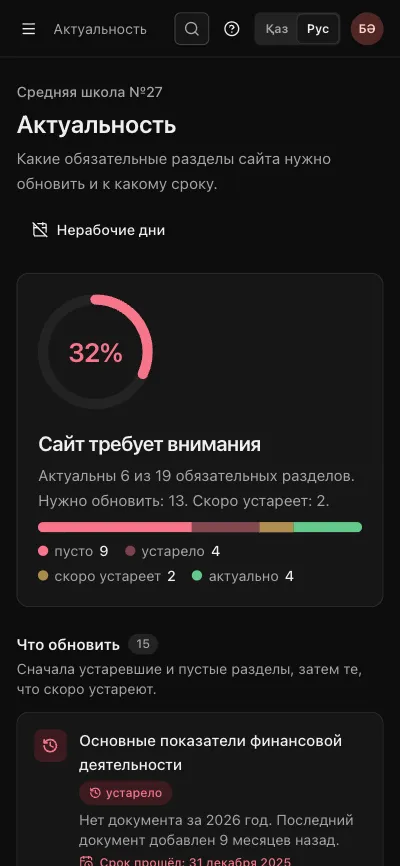
A school's to-do list on a phone: the share of up-to-date sections and, first in the list, a section that is out of dateA school's to-do list on a phone: the share of up-to-date sections and, first in the list, a section that is out of date

Non-working days count: one shared calendar of holidays and breaks.

Public websites

Sites: sober, fast, each with its own look

The look is assembled from ready-made parts rather than drawn anew for every organisation. A network's sites stay consistent, and each organisation can still show who it is.

  • 2 layouts and 6 palettes

    Block arrangement and colour set to choose from.

  • Your own colours

    With a contrast check so text stays readable.

  • Logo, photo, tagline

    The home page looks like this organisation's site.

  • Live preview

    Changes are visible before you apply them.

  • Kazakh and Russian

    More languages can be added.

  • Light pages

    They work without JavaScript and open quickly on inexpensive phones.

Try it yourself

Put a site's look together

The same layouts, palettes and contrast rules as in the admin panel. Pick a palette or set three colours of your own.

Palette
  • Primary colour on the background: contrast 7.5, at least 4.5 needed - passes
  • Black text on the background: contrast 19.4, at least 7 needed - passes
Layout

Palettes and layouts switch without JavaScript; your own colours need it.

Urgent: changes to tomorrow's timetable
School No. 1Secondary school
NewsMealsStudentsContacts
WelcomeSchool No. 1Knowledge that stays with you+7 700 000 00 00
Latest news
Open day
School olympiad results
New canteen menu
Sections
DocumentsTimetableTeachersMeals
Urgent: changes to tomorrow's timetable
School No. 1Secondary school
NewsMealsStudentsContacts
WelcomeSchool No. 1Knowledge that stays with you+7 700 000 00 00
Latest news
Open day
School olympiad results
New canteen menu
Sections
DocumentsTimetableTeachersMeals
Preview

Content and people

Keeping a site filled is routine work, not a separate project

Content

  • News, documents by year and quarter, staff, pages
  • Daily entries - a canteen menu, for example
  • A text editor and a file library
  • Images are processed automatically: metadata is removed, WebP copies are made
  • A bin with restore
  • Preview links

People and access

  • Roles: administrator, editor, observer
  • Access to an organisation 'with everything below' or 'this one only'
  • New staff join by invitation
  • A 'Staff sign-in' link in the footer of every site
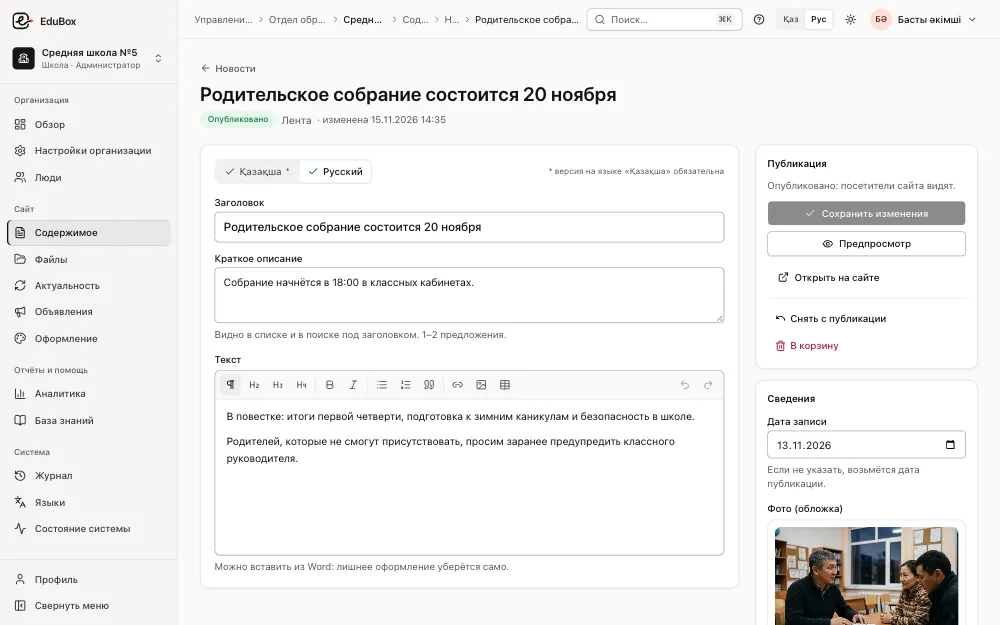
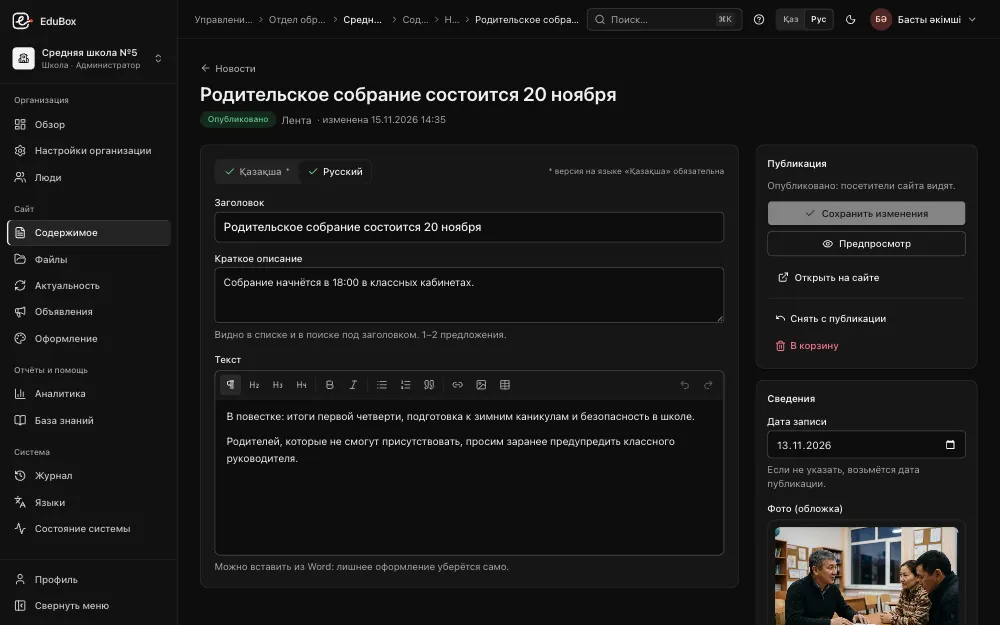
The news editor: Қазақша and Русский tabs, title, summary, text with a formatting toolbar, a publishing block and a cover photoThe news editor: Қазақша and Русский tabs, title, summary, text with a formatting toolbar, a publishing block and a cover photo

Top down

One announcement - on every site in the network

The organisation above no longer emails every school asking them to post something. It publishes once, and the sites below show it themselves.

Top-down announcements

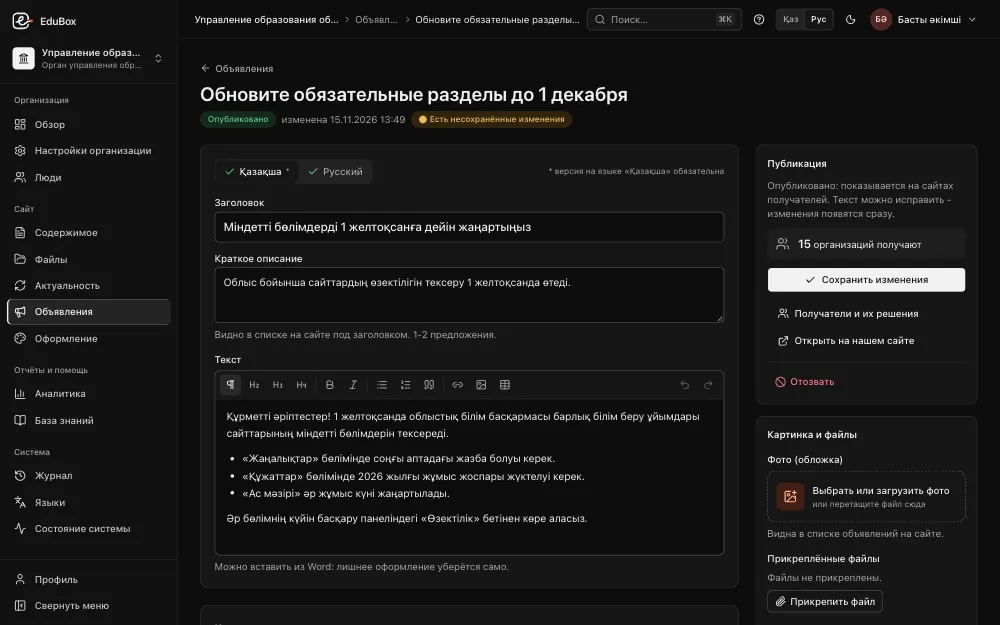
A head organisation or department writes an announcement once. A mandatory one appears straight away on the sites of every organisation below; a recommended one once the organisation's administrator accepts it. An urgent one shows as a red strip at the top of every page.

Catalogue of organisations

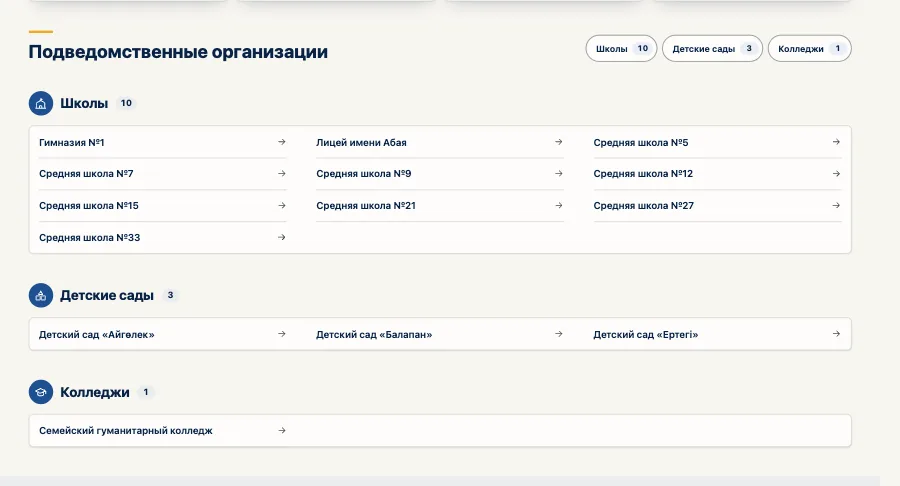
The head organisation's portal lists its organisations with links to their sites, so a visitor finds the right school or kindergarten in one place.

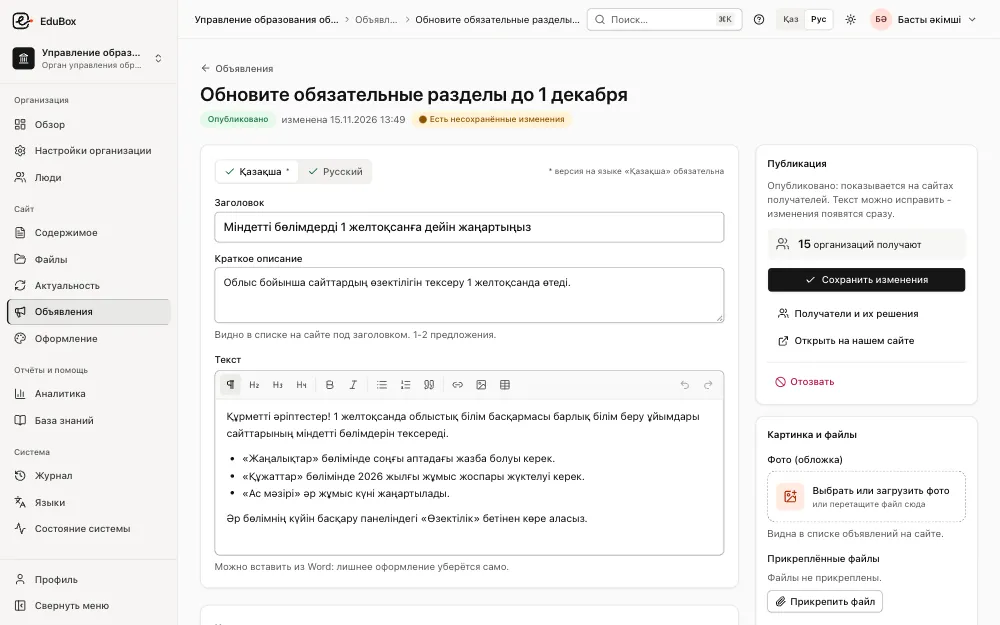
The head organisation's announcement editor in the admin panel: Kazakh and Russian texts and a publishing panel showing how many organisations receive itThe head organisation's announcement editor in the admin panel: Kazakh and Russian texts and a publishing panel showing how many organisations receive it
The catalogue of subordinate organisations on an education department's site: cards for schools and kindergartens linking to their sites

Seeing and learning

Who changed what, how many visits, and how to use it all

Activity journal

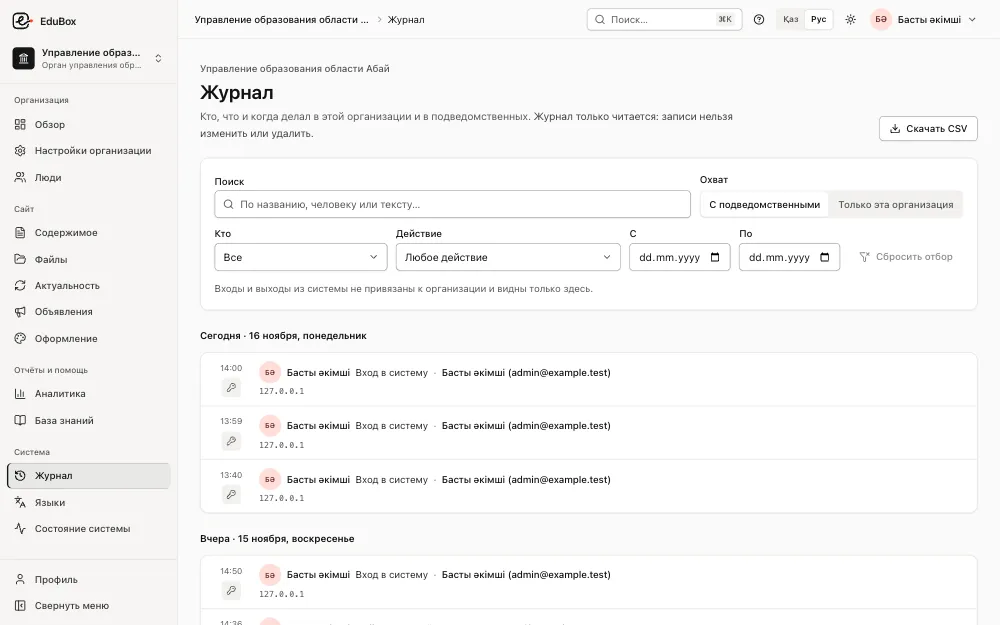
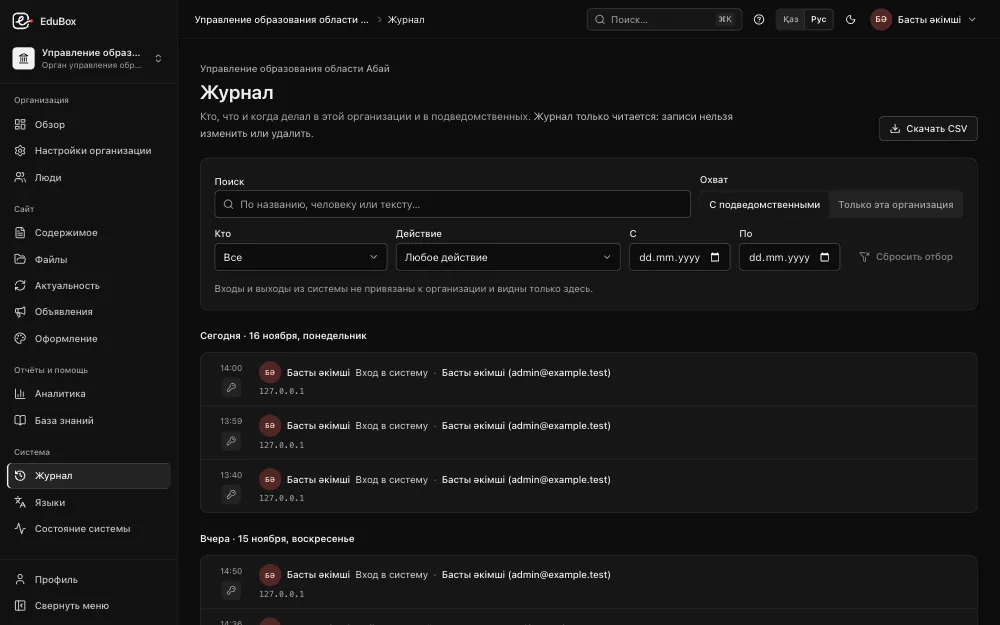
Who did what and when - in your organisation and the ones below it. Journal entries cannot be edited or deleted.

The activity journal in the admin panel: who did what and when, filtered by action and periodThe activity journal in the admin panel: who did what and when, filtered by action and period

Visit statistics without cookies

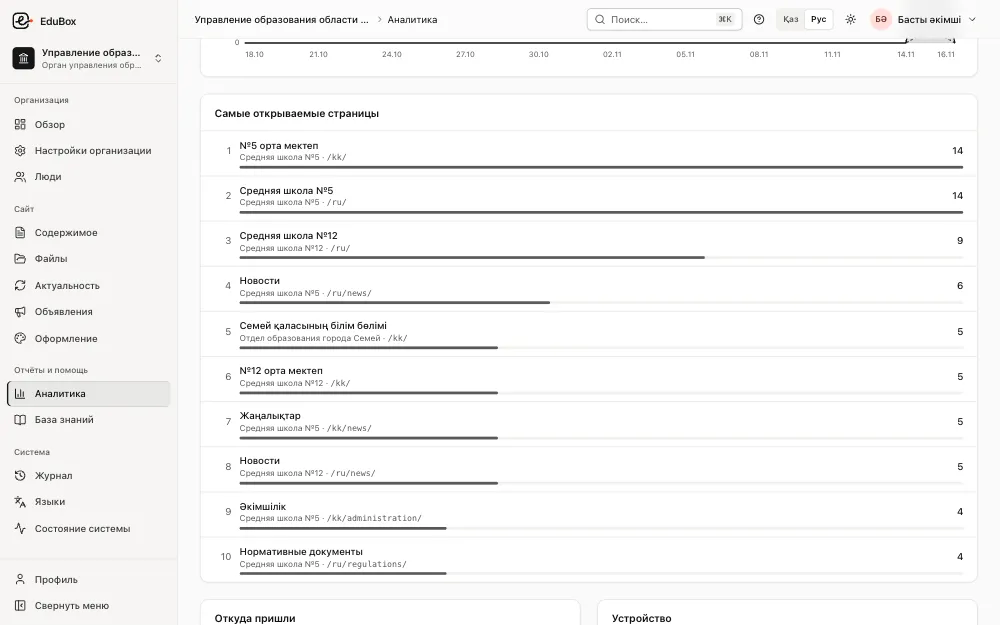
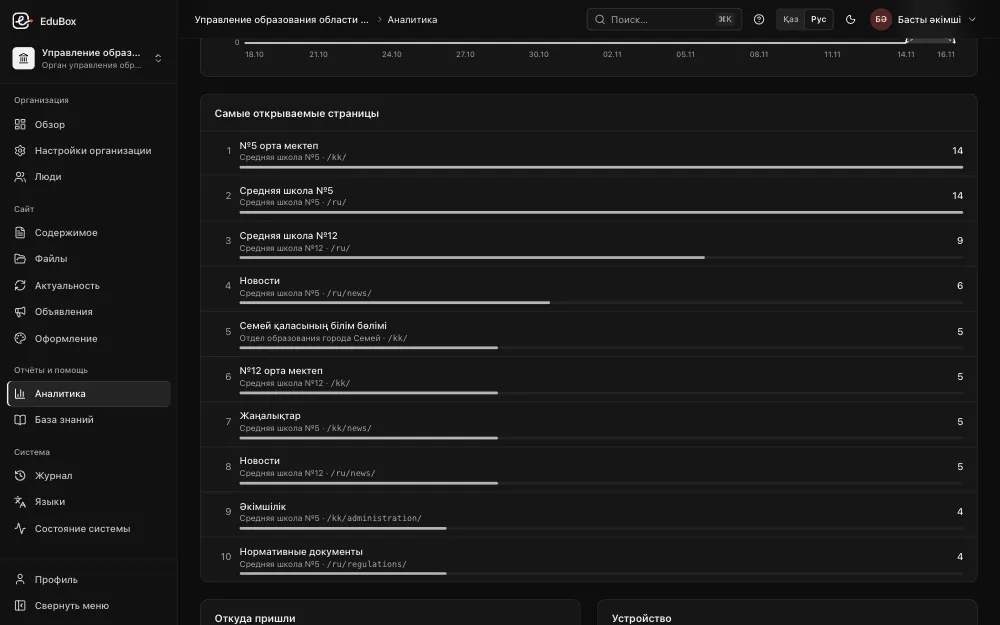
How many people open the site and what they read: pages, sections, where they came from, which devices. No cookies and no personal data; IP addresses are not stored.

Visit analytics in the admin panel: the most opened pages across the organisations' sites, with view countsVisit analytics in the admin panel: the most opened pages across the organisations' sites, with view counts

Knowledge base and short courses

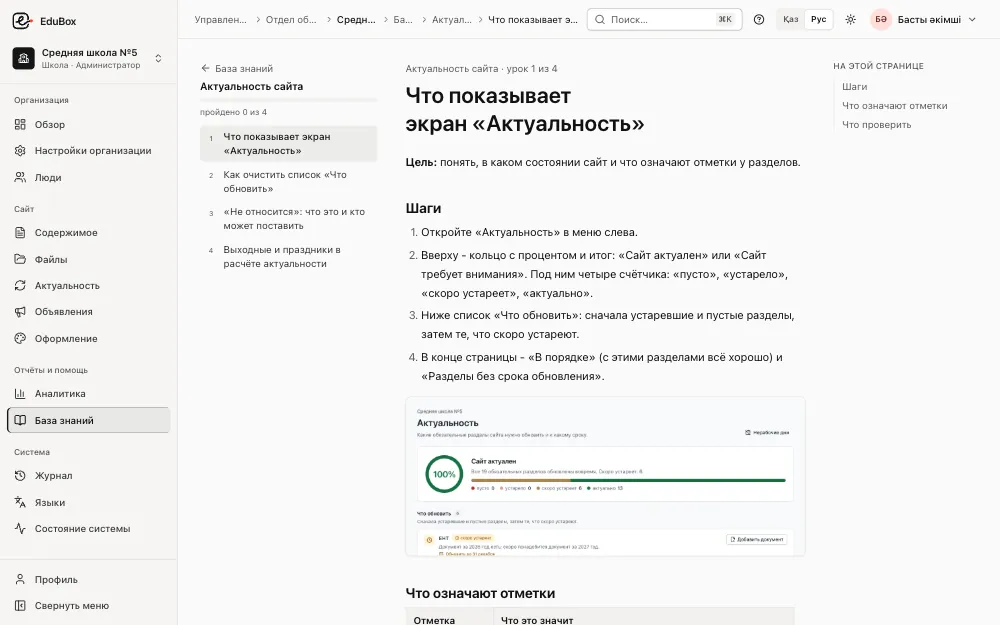
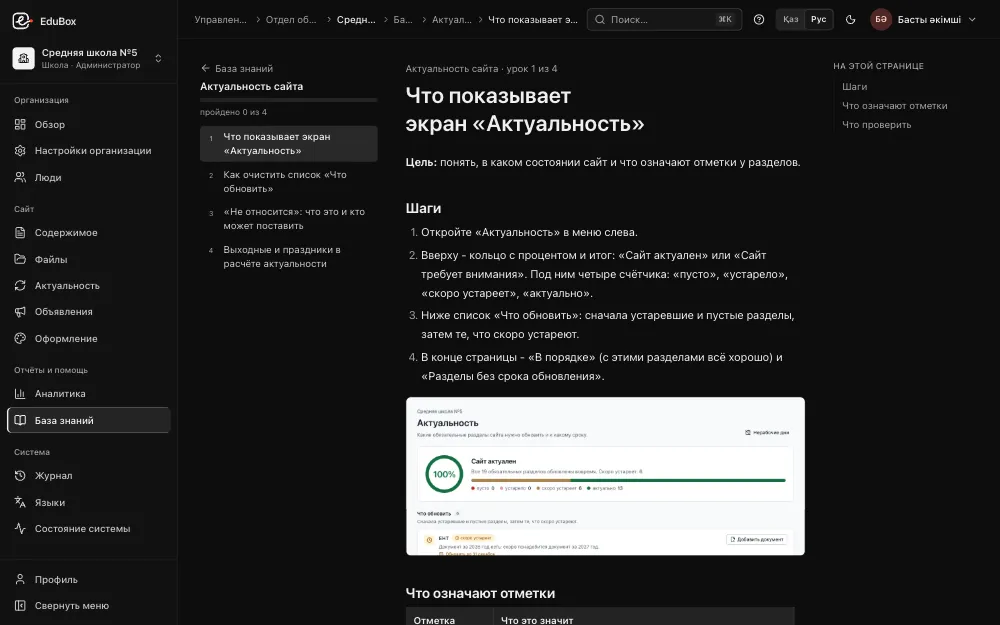
Right inside the admin panel: short lessons with screenshots for editors, organisation administrators and education departments.

Open the lessons on this site

A knowledge base lesson in the admin panel: the course's lessons, the steps and a screenshotA knowledge base lesson in the admin panel: the course's lessons, the steps and a screenshot

Installation and upkeep

Installed on your server with a few commands

EduBox Core is one program with a PostgreSQL database next to it. It runs behind the web server you already have, or on its own. Your data and sites stay on your server.

  • Daily backups Made automatically every night.
  • Restore with one command The archive is verified, and the current state is saved before restoring.
  • Behind your web server, or on its own Put it behind an existing nginx or run it without one.
  • Or hosted by us If you would rather not keep a server, hosting with us can be discussed.
Server commands
sudo ./edubox doctor
# check the server before installing
sudo ./edubox install
# install the program and the database
sudo edubox setup
# domain, first organisation, first administrator
sudo edubox backup
# an archive: database, files, settings
sudo edubox restore edubox-backup-….tar.gz
# verify an archive and restore it
edubox status
# version, database, disk, latest backup, certificate

Security and our own code

Our own code, reviewed from outside

  • Two independent security reviews

    Carried out during development. Every finding was fixed.

  • Uploads checked by content

    A file's type is determined by its content, not its name. Documents with macros are rejected.

  • Photos without extra data

    Metadata such as the location a photo was taken is removed.

  • Written from scratch

    A Rust core and a PostgreSQL database. Not a customised WordPress or any other ready-made CMS.

  • Access by tree

    Everyone sees and changes only their own organisations, within the role they were given.

  • Your data stays with you

    Sites, files and the database live on your server, with a backup every night.

An honest plan

In development

These are not in the product yet. We list them separately so that plans are not mistaken for what is ready.

  • One-command updates with signature verificationin development
  • Automatic HTTPS certificatesin development
  • Telegram notifications and remindersin development
  • Migration of existing sitesin development
  • An accessibility panel for visually impaired visitorsin development
  • Videoin development

Getting started

Start with a pilot

You can start with one branch of the tree or a few organisations: an education department with its schools and kindergartens, say, or a network's head office with two or three branches. The portal is installed on your server, every organisation gets its own site, and freshness tracking works from day one. The results show how the sites' content changes - and then the rest can join.

  1. 1A demo and a conversation about your structure
  2. 2Installation and the tree of organisations
  3. 3Sites, editors, the first entries
  4. 4A decision on bringing in the rest

Questions

Frequently asked questions

Does every school need its own server or hosting?

No. EduBox Core is installed once, and that installation runs the sites of every organisation: the head organisation, departments or branches, schools, kindergartens and colleges.

Where is the data stored?

On your server: the program, the PostgreSQL database, uploaded files and backups. If you have no server of your own, hosting with us can be discussed.

What address does an organisation's site get?

Each organisation gets its own address on a subdomain of your domain - for example, school-1.edu.example.kz. The admin panel is at admin.edu.example.kz.

Can a school change its own design?

Yes, within shared rules: two layouts, six palettes or its own colours with a contrast check, a logo, a home-page photo and a tagline. Changes show in a preview before they are applied.

Which languages do the sites support?

Kazakh and Russian. More languages can be added.

How does the organisation above see that sites are not being updated?

Every required section has an update period. A department sees an organisations-by-sections table; the head organisation sees a summary by department or branch.

Is it WordPress or another ready-made CMS?

No. The core is written from scratch in Rust, with a PostgreSQL database. Two independent security reviews were carried out during development, and every finding was fixed.

What if the server fails?

A backup of the database, files and settings is made automatically every night. Restoring takes one command, and the archive is verified first.

Where do we start?

With a demo and a pilot: one branch of the tree or a few organisations. Write to us and we will arrange a demo.

Who we are

The development team

We are the team building EduBox Core. We write the engine ourselves - from the core to the admin panel and the site templates.

  • The core, site templates and admin panel are our own code
  • Two independent security reviews, every finding fixed
  • A working product: we will show it on a demo portal

Contact

Request a demo

We will show you a working portal: organisation sites, the admin panel and freshness at every level, and answer your questions about servers, installation and hosting.

To arrange a demo, please contact a member of the team - we will share contact details when we meet.

Open the demo